
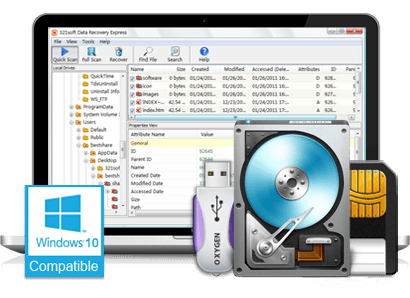
Following is a Quick Start Guide to using Data Recovery Express:
Step 1: Before using Data Recovery Express, you should download the zip file. then unzip it to a folder. Please do not unzip or install the software on the same drive as which you will scan and recover data to avoid possible damage of the original data.Step 2: Run the EXE file "321datarecovery.exe" .
If you are using Windows 8, Just click your mouse's right button on the program icon, then select the menu item "Run as Administrator" to run the 321Soft Data Recovery Express, and it will run smoothly.
Step 3: Select a drive from the left tree view list under "My Computer".
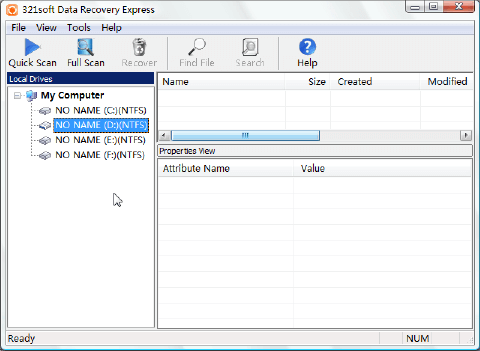
Step 4: Then click the button "Quick Scan" or "Full Scan" to start scanning.
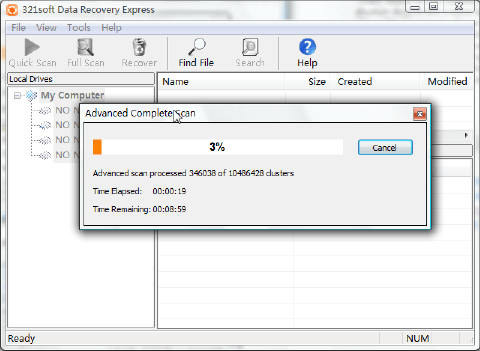
Note: Data Recovery Express supports both quick scan and full scan modes. If you can not find deleted or lost files by a quick scan, you may try a full scan. A full scan will scan all sectors and clustors on a drive to find possible data blocks, this procedure may cost a very long time according to the drive volume.
Step 5: When scanning is finished, search for the files that you want to recover from the scanned result.
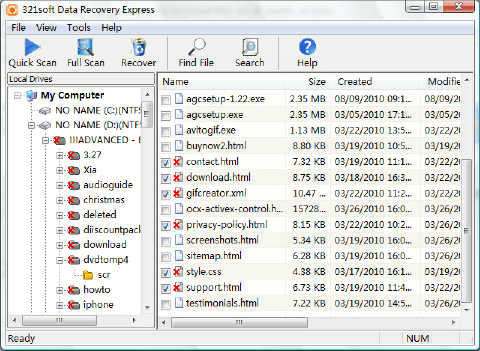
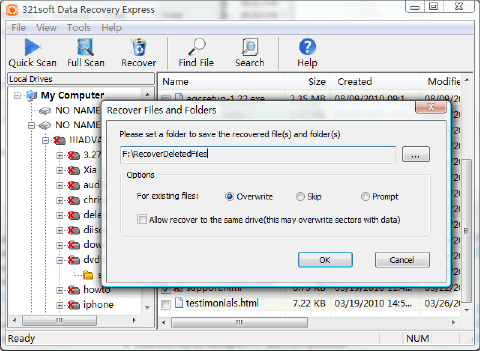
Step 6: If you found the deleted files, check them, then click the "Recover" button from toolbar. and recover them to another drive.

I couldn't believe it when my pc crashed and I lost a year's worth of my univeristy work. Data Recovery Express clearly explained their process and costs. Within a week my university data was recovered and I was back on track with my studies. That's what I call a real life saver!
 - Brook
I sent my drive to two firms before trying Data Recovery Express, one couldn't recover it the other quoted pricing through the roof. I got all my photos and data back for a reasonable price and was very happy with the service.
- Henry
- BrookI sent my drive to two firms before trying Data Recovery Express, one couldn't recover it the other quoted pricing through the roof. I got all my photos and data back for a reasonable price and was very happy with the service.
- Henry
Awards:




Find out why we're ranked #1
Need Data Recovery software, you come to the right place, Download the Free version Now!


